University Gateway for Large Language Models
- We employ LiteLLM as the universal gateway to all our applications requiring access to LLMs.
- The gateway also allows you to use the provided LLMs directly with your local applications (e.g. Claude Science, OpenCode, Codex, etc.). You can obtain an API key for our centrally administered LiteLLM service using the procedure below.
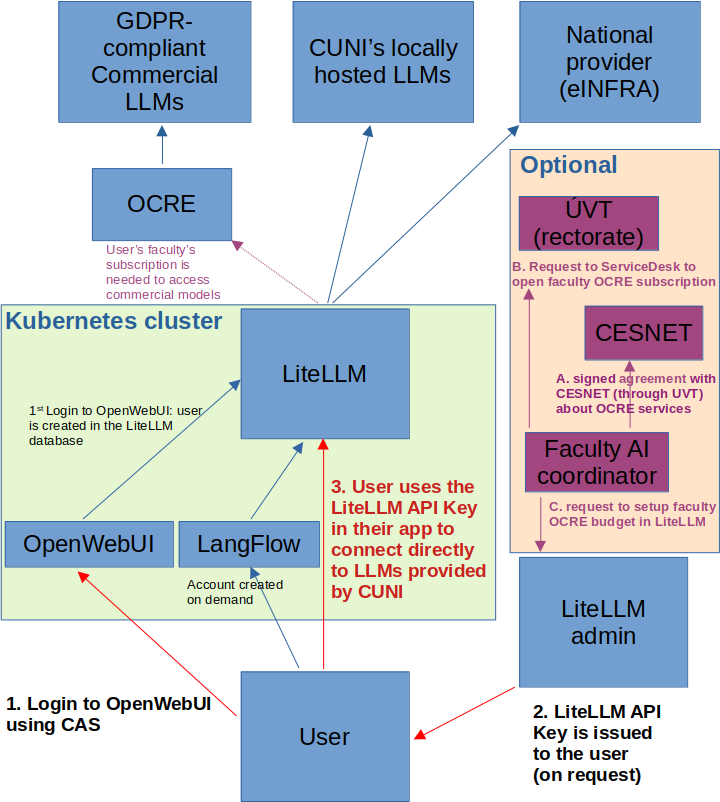
- The scheme for obtaining your private API key is shown below.
The Gateway provides access to the following models as of 21 October 2026. Use the model names exactly as shown in your applications:
| Model name | Provider |
|---|---|
gpt-oss-120b-local |
CUNI (local) |
nemotron-3.5-lightning-local |
CUNI (local) |
paddleocr-vl-1.6-local |
CUNI (local) |
deepseek-v4-flash |
e-INFRA CZ |
gemma4 |
e-INFRA CZ |
glm-5.3 |
e-INFRA CZ |
gpt-oss-120b |
e-INFRA CZ |
kimi-k3 |
e-INFRA CZ |
mistral-medium-3.5 |
e-INFRA CZ |
qwen3.8-27b |
e-INFRA CZ |
claude-haiku-4-5 |
Anthropic (testing only) |
claude-opus-5 |
Anthropic (testing only) |
claude-sonnet-4-5 |
Anthropic (testing only) |
Models ending in -local run on CUNI infrastructure. The other non-Claude models are provided by e-INFRA CZ and run in the dedicated sensitive part of its infrastructure when accessed via the Gateway (API key).
The Claude models are available for testing only, with a budget of USD 5. The models available to your API key depend on your user group. You can check the current list with:
curl -H "Authorization: Bearer <your-virtual-key>" https://litellm.hpc.cuni.cz/v1/models
Obtaining a private LiteLLM API key
You can connect any of your applications using the university's LiteLLM service. To do that you'll need an API key for the LiteLLM gateway.
- Connect to the OpenWebUI service using your CAS. Access to this service will be approved by the service admin.
- You'll receive an email notification informing you of the approval, including the possibility to request a LiteLLM API key.
- Login to OpenWebUI again. This registers your details in the LiteLLM database.
- Request the API key from the LiteLLM admin who will also communicate with you about your assignment to the relevant user group.
Access to commercial models beyond the Claude testing provision may be available to you if your faculty has an active OCRE subscription, see below. Whether you personally have access to the faculty's subscription is a matter of internal faculty politics. On your request the LiteLLM admin assigns you to the desired user group. Token spendings are always traceable down to the individual users.
Token limits for the local models (CUNI)
Currently, no token usage limits are implemented but we expect that such limits will need to be implemented in the future with the growing demand for the service.
Faculty subscriptions to the OCRE service
The Open Clouds for Research Environments (OCRE) is an EU framework providing access to commercial cloud providers for research institutions. It provides access to GDPR-compliant services such as the Amazon Bedrock.
Currently, the following faculties are known to have or are in the process of obtaining OCRE subscription:
| Faculty/Unit name | OCRE subscription status |
|---|---|
| 2nd Faculty of Medicine | pending |
| Faculty of Mathematics and Physics | pending |
| Central Library | pending |
How to get an OCRE subscription
The University's Information and Communication Technologies department (UVT) can open the faculty's OCRE subscription which is available through a framework agreement between UVT and CESNET. To use that, your faculty (dean) must sign a formal specification of the services provided by CESNET. This will then allow recharging of the spendings between UVT and the faculty. This process is typically initiated by the faculty AI coordinator in collaboration with UVT.
When the agreement between your faculty and CESNET has been finalized the AI coordinator submits a request on behalf of the faculty to the UVT ServiceDesk. The request must include the following information:
- Name of the subscription, including the faculty prefix, e.g. "LF2-".
- Name of the account coordinator and their CAS ID.
- Initial financial cap in EUR for spending notifications.
The faculty's account will be setup and the spendings subsequently recharged to the faculty.
Finally, the AI coordinator contacts the LiteLLM admin to setup the faculty's budget in the system and to specify the user groups from the faculty which have access to this subscription.
Schema
The figure below shows a graphical schema of the workflows required to obtain a private LiteLLM API key and to setup a faculty OCRE subscription.