LangFlow
Access: https://langflow.hpc.cuni.cz/login
LangFlow is a visual builder for LLM applications and agentic workflows. Instead of writing orchestration code, you assemble a flow on a canvas from components - a chat input, a model, a prompt template, a tool, a vector store, a chat output - and connect their inputs and outputs. The resulting graph is the program: you can run it, inspect what each node received and returned, change a prompt, and run it again.
On our infrastructure LangFlow runs as a hosted web application on the Kubernetes cluster, so there is nothing to install. You work with it entirely in your browser, and your flows are stored server-side in your account.
Access is granted on request
LangFlow does not support login with CAS credentials. Access is granted on a per-request basis, and each user gets their own account created manually.
To obtain access, contact the Kubernetes user admin and ask for a LangFlow account. You will receive login credentials by e-mail. Contact support@hpc.cuni.cz with questions and issues with the service.
Because accounts are created by hand, please do not share your credentials with colleagues - ask them to request their own account instead. Flows, credentials, and API keys stored in LangFlow are bound to your account.
Models
LangFlow itself does not provide any models. Each flow needs a model component with credentials, and you have two options:
- The university's University Gateway (LiteLLM). The recommended way is the built-in LiteLLM Proxy component, described below. Because the gateway is OpenAI-API compatible, any OpenAI-style model component pointed at the gateway works as well.
- Your own API key from a commercial provider, entered directly in the model component.
Store keys in LangFlow's Global Variables (secret type) rather than typing them into individual nodes. That way a flow you export or share does not carry your key with it.
WARNING: A LangFlow flow can call tools, execute Python, reach external APIs, and send whatever it reads to a model provider. Do not put secrets, passwords, private keys, patient data, or other data you are not allowed to share into a flow. Anything a flow does remains your personal responsibility.
Connecting to the University Gateway
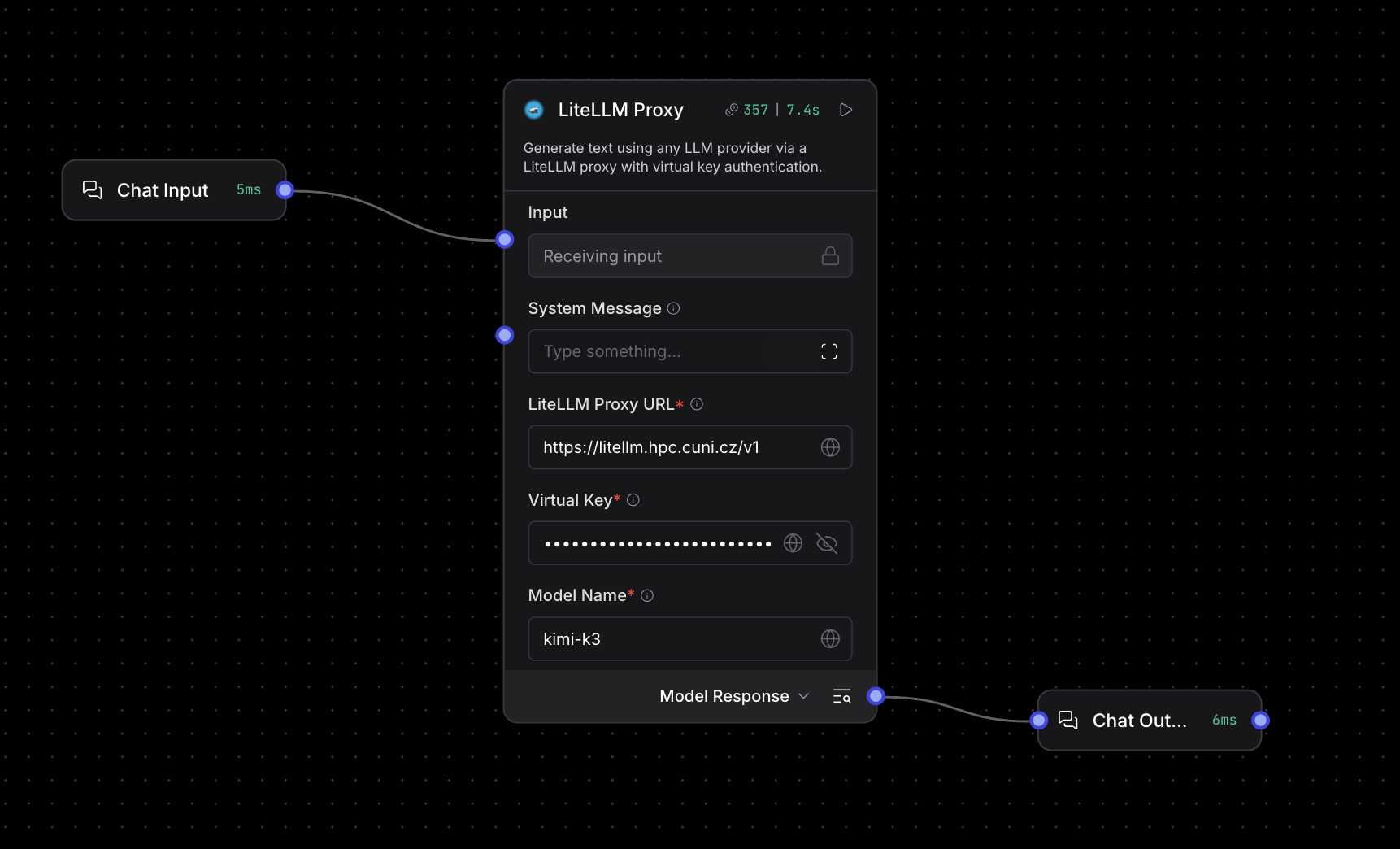
- In the components sidebar, search for LiteLLM Proxy and drag it onto the canvas.
- Fill in its fields:
- LiteLLM Proxy URL:
https://litellm.hpc.cuni.cz/v1 - Virtual Key: your personal LiteLLM API key. "Virtual key" is just LiteLLM's name for the API key you received from the LiteLLM admin - see University Gateway for how to obtain one. Bind it to a secret Global Variable instead of pasting it into the node.
- Model Name: the exact model name from the table below. The component does not list the available models, so you have to type the name yourself.
- LiteLLM Proxy URL:
- Connect Chat Input to the component's Input and its Model Response output to Chat Output. Optionally, write a System Message.
- Open the Playground and send a short message to check that the connection works.
Using a gateway model in an Agent
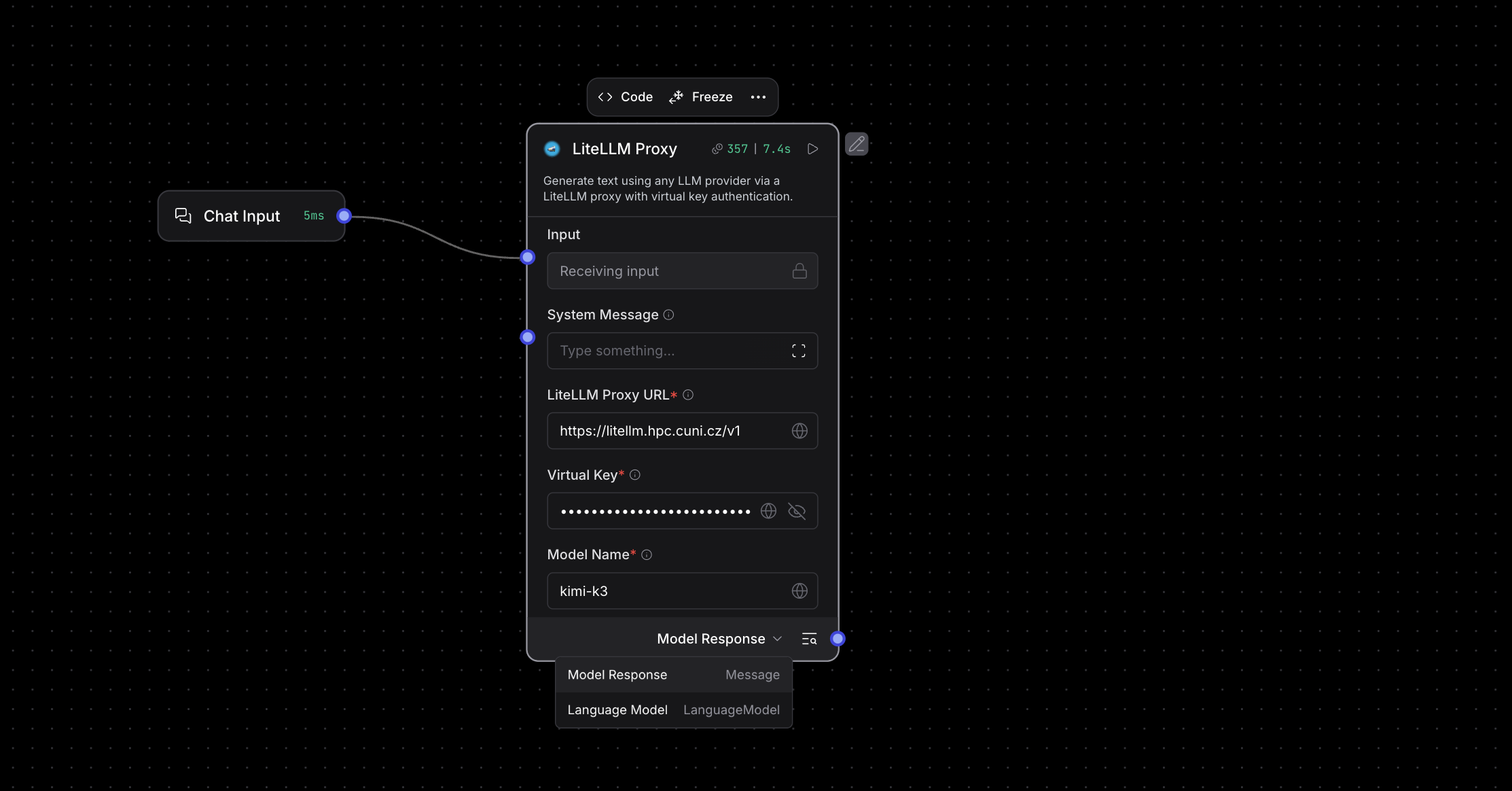
The same component can serve as the language model of an Agent:
-
Click the output selector at the bottom of the LiteLLM Proxy component and switch it from Model Response to Language Model.
-
Connect the Language Model output to the Agent's Language Model input.
- Connect the Toolset outputs of the tools you want the agent to use (e.g. Python Interpreter, Web Search, Calculator) to the Agent's Tools input.
- Connect Chat Input to the Agent's Input and the Agent's Response to Chat Output, and write the Agent Instructions.
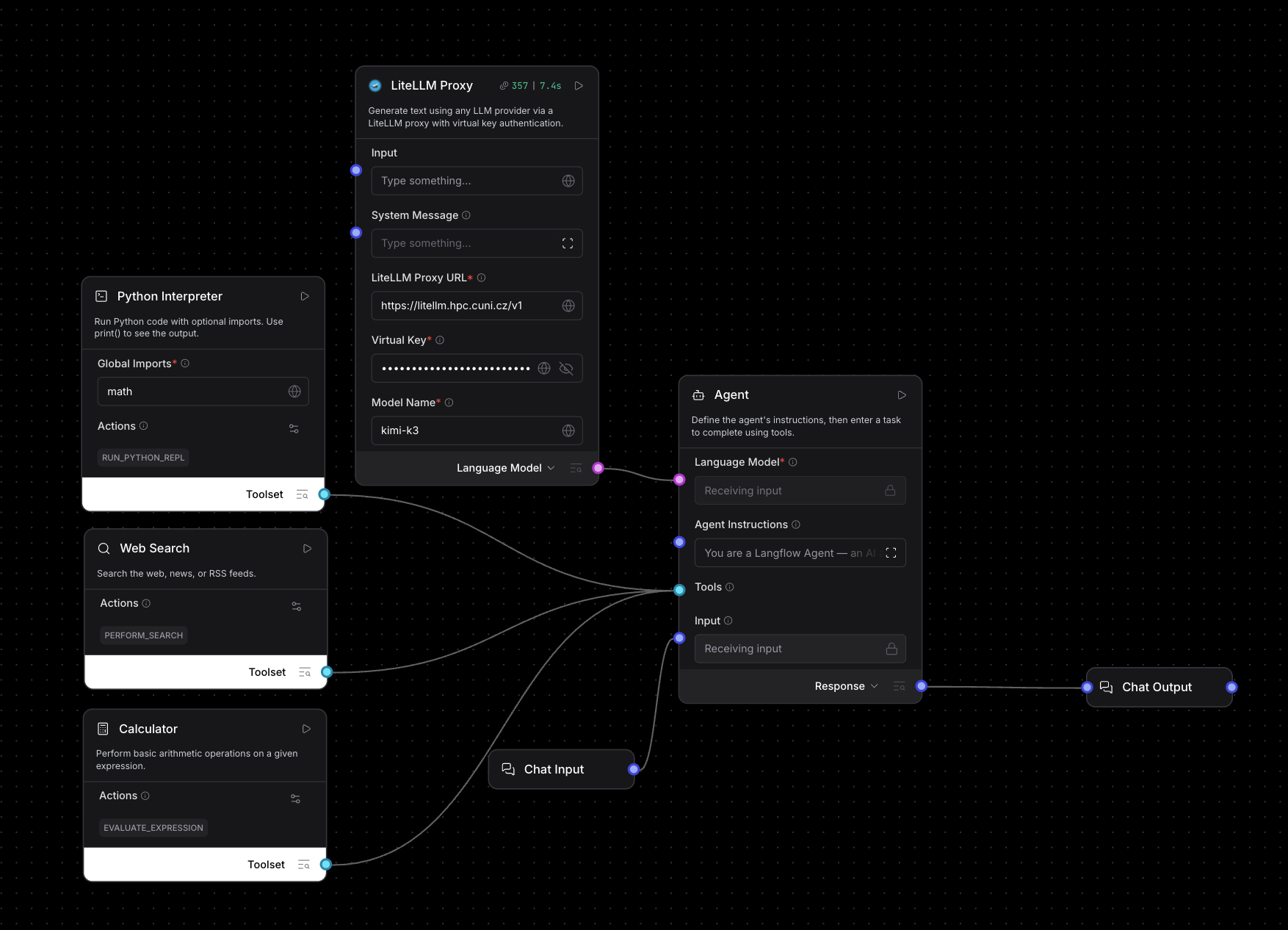
For agents that call tools, choose a model that handles tool calling well, e.g. kimi-k3, gpt-oss-120b, or deepseek-v4-flash.
Available models
Models available through the University Gateway as of 21 October 2026. Type the name into the Model Name field exactly as shown:
| Model name | Provider |
|---|---|
gpt-oss-120b-local |
CUNI (local) |
nemotron-3.5-lightning-local |
CUNI (local) |
paddleocr-vl-1.6-local |
CUNI (local) |
deepseek-v4-flash |
e-INFRA CZ |
gemma4 |
e-INFRA CZ |
glm-5.3 |
e-INFRA CZ |
gpt-oss-120b |
e-INFRA CZ |
kimi-k3 |
e-INFRA CZ |
mistral-medium-3.5 |
e-INFRA CZ |
qwen3.8-27b |
e-INFRA CZ |
claude-haiku-4-5 |
Anthropic (testing only) |
claude-opus-5 |
Anthropic (testing only) |
claude-sonnet-4-5 |
Anthropic (testing only) |
- All models ending in
-localrun on CUNI infrastructure, where data stays within Charles University. The other non-Claude models are provided by e-INFRA CZ and run in the dedicated sensitive part of its infrastructure. - The Claude models are available for testing only, with a budget of USD 5. Use only non-sensitive and public data with these models.
- The list changes over time, and which models your key can use depends on your user group. To get the current list for your key, run:
curl -H "Authorization: Bearer <your-virtual-key>" https://litellm.hpc.cuni.cz/v1/models
What you can do with it
Prototype and compare prompts
The smallest useful flow is Chat Input → Prompt Template → Model → Chat Output. In the built-in Playground you chat with the flow and inspect every intermediate value, which makes it a fast way to iterate on a system prompt or compare two models on the same task without writing any code.
Build agents with tools
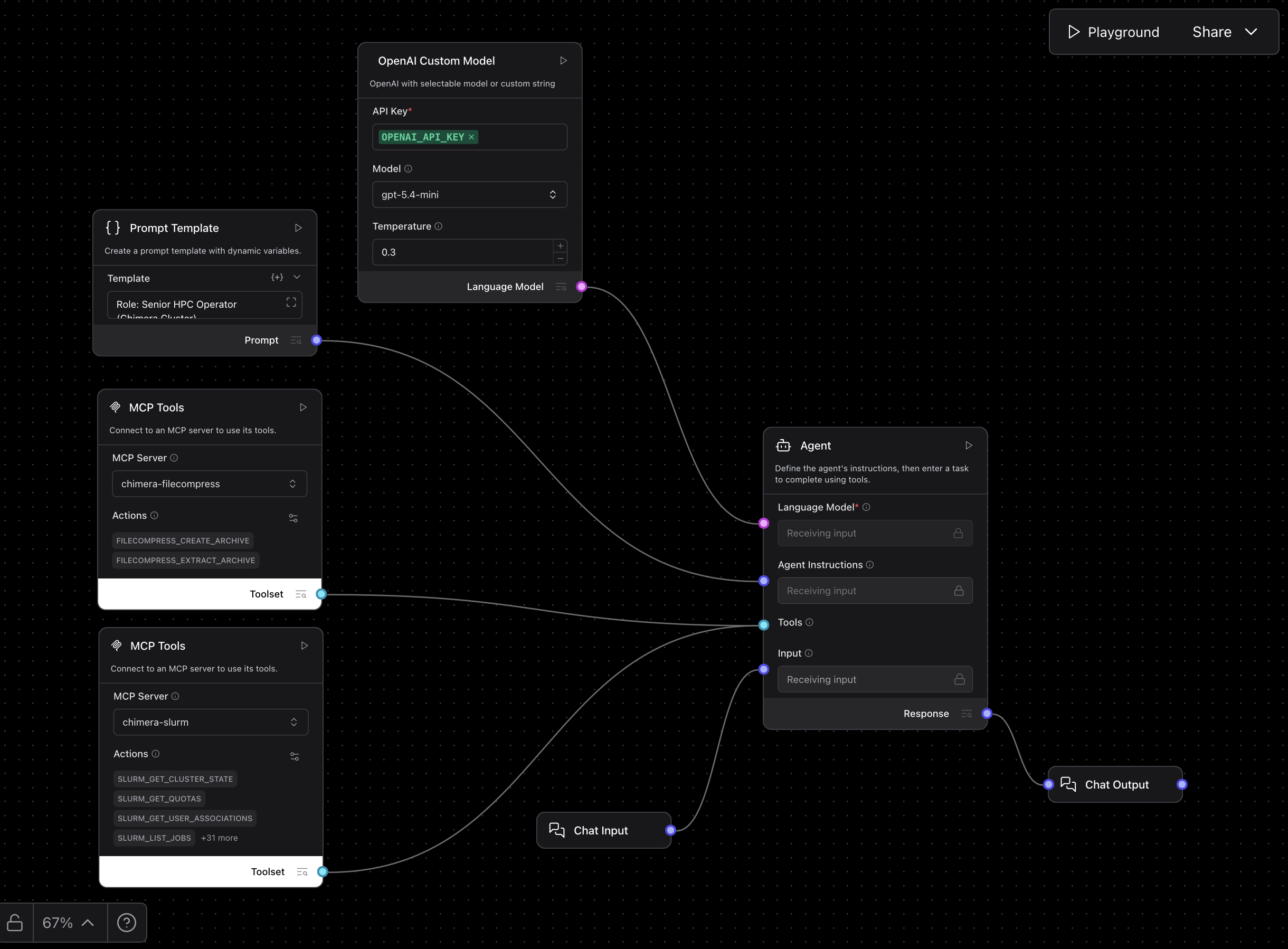
An Agent component takes a language model, a set of instructions, and a toolset, and decides for itself which tools to call. Tools can be built-in components (web search, URL fetching, arXiv, a Python interpreter, file readers) or entire MCP servers connected through the MCP Tools component.
This is how an agent gets access to Chimera. The chimera-slurm and chimera-filecompress MCP servers described in AI Interfaces for Chimera can be attached to a LangFlow agent, which then answers questions about cluster state, quotas, and jobs, and creates or extracts archives - the same tools, driven from a browser instead of a terminal client.
Multi-agent pipelines
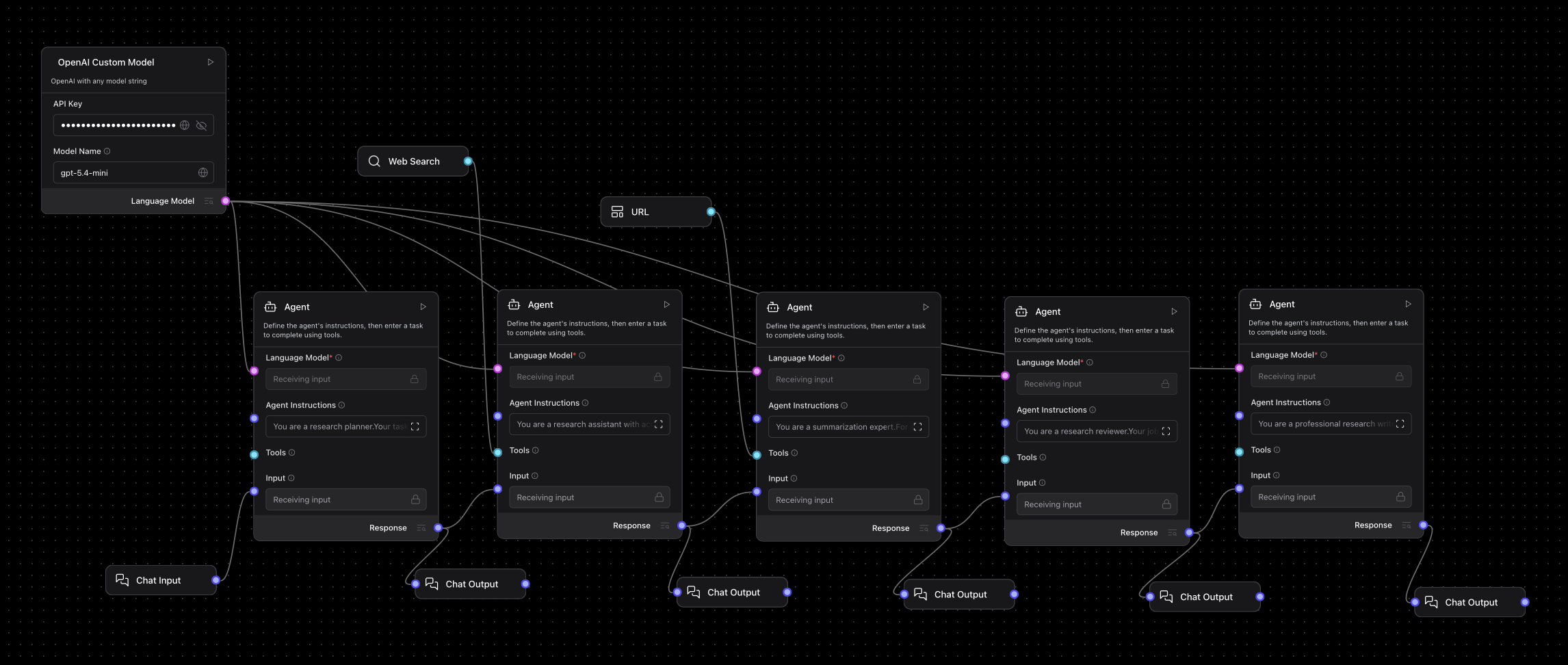
Agents can be chained, so that one plans, another gathers sources, a third summarizes, a fourth reviews, and a fifth writes the final text. Each stage has its own instructions and its own output you can inspect, which is exactly why LangFlow is useful for teaching: the division of labour between agents is visible on the canvas rather than buried in code.
Write your own components
When no built-in component fits, add a Custom Component and paste Python into its code editor. A component declares its inputs and outputs and returns a normal Langflow type, so your own code plugs into the canvas like anything else. This is how a provider that LangFlow does not ship with, or a domain-specific API such as ClinVar or PubMed, gets added to a flow.
Publish a flow as an API
Every flow can be called from outside LangFlow over HTTP, so a prototype you built on the canvas can be used from a script or another application without being rewritten.
Course materials and example flows
Our workshop Agentic Systems in Biomedicine uses LangFlow as its main teaching tool. All materials, slides, and importable example flows are public:
https://github.com/rse-cuni/Agentic-Systems-in-Biomedicine
The repository contains seven ready-made agents under Langflow/Agents/, each with its own README, screenshots, and a .json export:
| Agent | What it demonstrates |
|---|---|
LabValuesInterpreterAgent |
Structured educational interpretation of laboratory results |
LiteratureAgent |
Staged literature search and synthesis using arXiv, web search, and URL retrieval |
DeepResearchAgent |
Multi-agent pipeline: planning, gathering, summarizing, review, and final writing |
StatisticalAssistantAgent |
Analysis of uploaded datasets through file reading and a Python interpreter |
PersonalAssistantAgent |
Operational assistant across mail, documents, and calendar, with a RAG branch |
HPCOperatorAgent |
Chimera Slurm and archive operations through MCP tools |
VariantInterpretationResearchAgent |
ClinVar-first variant evidence workflow |
The repository also provides an e-INFRA CZ model component and a general-purpose custom OpenAI component that lets you type any model string, which is useful when a LangFlow release does not yet list a newly published model.
These flows are teaching prototypes, not finished products. Several of them deliberately expose the points where human review, restricted tool access, and honest reporting of uncertainty matter.
Importing a flow
- Download the agent's
.jsonfile from the repository. - Open LangFlow and drag the file onto the workspace.
- Open the model node in the imported flow and fill in your API key, or bind it to a global variable. If you use the University Gateway, replace the model node with a LiteLLM Proxy component (see Connecting to the University Gateway).
- Check the setup notes in that agent's README - some flows need extra components, MCP servers, or a Python library.
- Run a small request in the Playground first, to confirm the flow loads and the main tool path is connected, before attempting a full task.
See also
- Agentic platforms for research - the agent applications that run inside a JupyterHUB session on Chimera.
- Kubernetes cluster - the infrastructure hosting this service.
- University Gateway - how to obtain a LiteLLM API key.
- LangFlow documentation - the upstream reference.